> ## Documentation Index
> Fetch the complete documentation index at: https://docs.coralmessaging.com/llms.txt
> Use this file to discover all available pages before exploring further.
# Hubspot
> How to connect to Hubspot and manage your integration
Integrating HubSpot with your Coral account is simple and quick. One set up, your Coral WhatsApp integration supports the following:
* **Daily chat sync** - Transcripts from all chats will be uploaded in a daily batch to Hubspot, at midnight according to a timezone of your choosing.
* **Automatic association with Contacts and Deals** - Your chat transcripts can sync to both Contact records and Deal records.
* **Contacts sync** - Your new contacts in WhatsApp can be added to Hubspot automatically, and details about your Hubspot Contacts can be added to your Coral account.
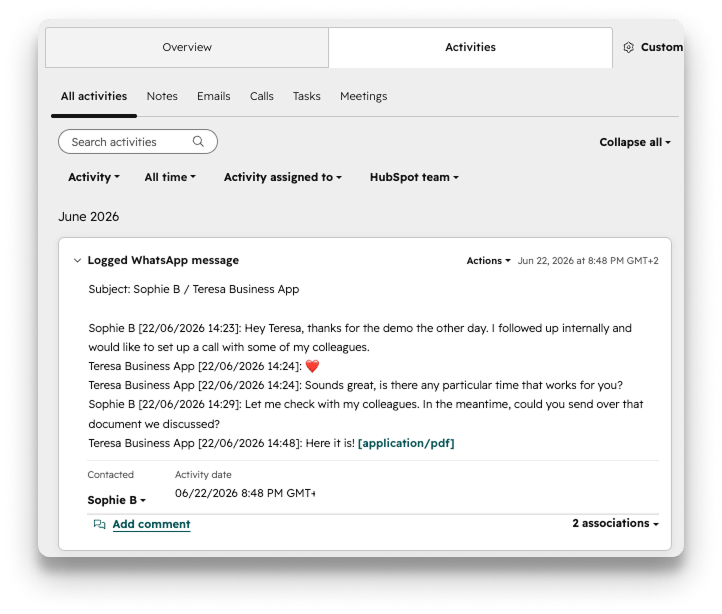 ## Integration Requirements
* **Active HubSpot account** - Ensure your HubSpot account is set up and functioning properly. Both **free** and **paid** HubSpot plans support the Coral integration. You will need your Hubspot API keys with you when making the connection (given to you by your Hubspot admin). You must have your client's WhatsApp phone number populated in the WhatsApp Phone Number field of your Hubspot Contacts for the sync to work.
* **Required Coral permissions** - Only a Coral Admin user can set up Coral integrations.
## Set up the Integration
Log in to your Coral Admin account, go to the Integrations tab. There you can choose your integration. Choose to send batched messages to Hubspot, and click Connect. Ensure that your record view settings in Hubspot are set to view WhatsApps (Activities tab --> Activity drop down --> select WhatsApp). You're done! The chat transcript sync will take place as long as there is any activity in a Coral chat where there is also one of your Hubspot Contacts in the chat.
## Integration Requirements
* **Active HubSpot account** - Ensure your HubSpot account is set up and functioning properly. Both **free** and **paid** HubSpot plans support the Coral integration. You will need your Hubspot API keys with you when making the connection (given to you by your Hubspot admin). You must have your client's WhatsApp phone number populated in the WhatsApp Phone Number field of your Hubspot Contacts for the sync to work.
* **Required Coral permissions** - Only a Coral Admin user can set up Coral integrations.
## Set up the Integration
Log in to your Coral Admin account, go to the Integrations tab. There you can choose your integration. Choose to send batched messages to Hubspot, and click Connect. Ensure that your record view settings in Hubspot are set to view WhatsApps (Activities tab --> Activity drop down --> select WhatsApp). You're done! The chat transcript sync will take place as long as there is any activity in a Coral chat where there is also one of your Hubspot Contacts in the chat.
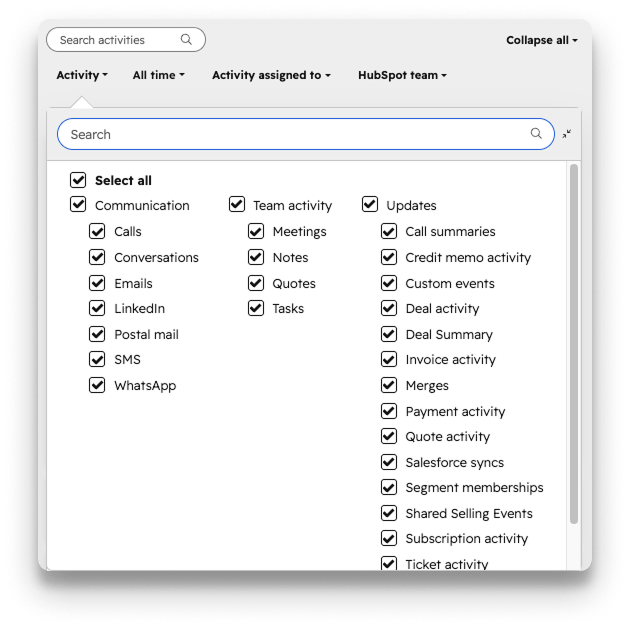 Optional steps:
* Your Coral WhatsApp chat transcripts will be uploaded to Hubspot daily around midnight, according to the timezone that you choose. To select your timezone, navigate to the Controls tab in your Coral Admin account.
* To sync Coral chats to Deals in addition to Contacts, please provide your Coral rep with your Hubspot deal pipeline names.
Optional steps:
* Your Coral WhatsApp chat transcripts will be uploaded to Hubspot daily around midnight, according to the timezone that you choose. To select your timezone, navigate to the Controls tab in your Coral Admin account.
* To sync Coral chats to Deals in addition to Contacts, please provide your Coral rep with your Hubspot deal pipeline names.