> ## Documentation Index
> Fetch the complete documentation index at: https://docs.coralmessaging.com/llms.txt
> Use this file to discover all available pages before exploring further.
# WhatsApp Billing
> WhatsApp pricing and setting up a payment method
### WhatsApp pricing
**WhatsApp charges for your usage of their underlying platform to send *most* template messages into your chats**. WhatsApp’s pricing per template send depends on the type of template, and the price is charged for each person / recipient that is in your group chat. Pricing for per template and recipient country is the same for direct chats and group chats. Whenever you invite a person to join a group with the Coral product, you will be sending them a Utility template and will therefore be charged for this. There is no cost to send a template into a chat for any chats that have had a message sent by any participant in the past 24 hours, since it’s considered part of an open conversation. You will be charged directly by WhatsApp to the credit card that you have associated to your Meta Business Portfolio account.
Below are the prices per template sent per recipient country/region, to give you a rough idea of cost. Charges are based on the country in which the recipient is based, according to their phone number country code. In most markets, the price per template delivered is comparable to SMS message send rates.
| Type | North America (USD) | United Kingdom (GBP) | Europe (EUR) | Brazil (BRL) |
| :-------------------------------------------------------------------------- | :------------------ | :------------------- | :----------- | :----------- |
| Marketing (eg “You’re invited to XYZ event”) | 0.025 | 0.0509 | 0.1186 | 0.356 |
| Service (eg “We’ve looked into your issue and have done XYZ”) | free | free | free | free |
| Utility (eg “Your order has been shipped”, or invites to a new Coral group) | 0.004 | 0.0159 | 0.0248 | 0.0456 |
More information on pricing is available from WhatsApp [here](https://developers.facebook.com/docs/whatsapp/pricing/).
### Setting up a payment method
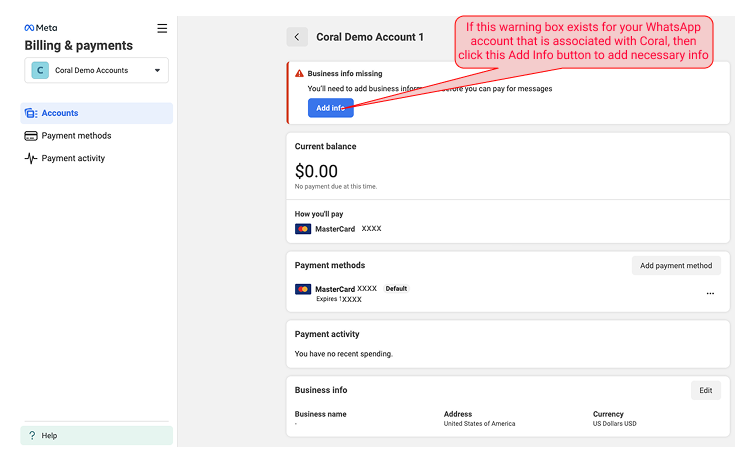
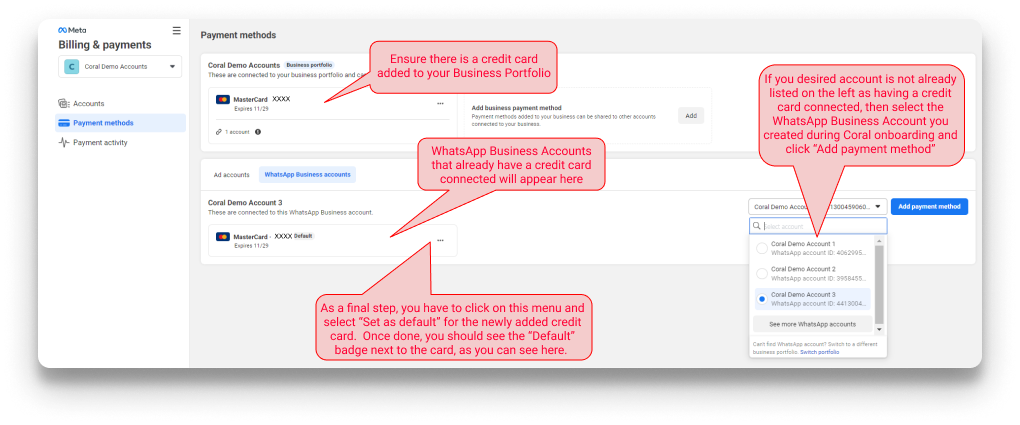
In order to send template messages into any chat, you need to have a credit card added to your WhatsApp Business account (the account your organization’s Admin created when they signed up for Coral Messaging) so that the charge can be triggered by WhatsApp to your organization’s WhatsApp Business account. You can add a credit card by having your Meta Business Portfolio admin go to [Meta Billing & Payments](https://business.facebook.com/billing_hub). Navigate to the Payment methods tab. Here is what the screen should look like:
 Now navigate to the Accounts tab and choose the relevant WhatsApp Business account, and click into it. Your screen should look like this: