
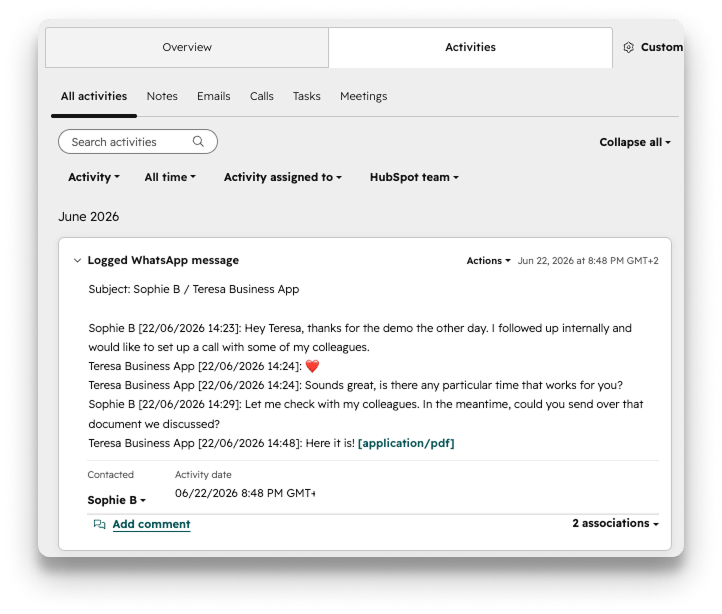
- Daily chat sync - Transcripts from all chats will be uploaded in a daily batch to Hubspot, at midnight according to a timezone of your choosing.
- Automatic association with most objects - Your chat transcripts can sync to any object of your choosing: Contacts, Companies, Deals, Tickets, Projects, and more.
- Contacts sync - Your new contacts in WhatsApp can be added to Hubspot automatically, and details about your Hubspot Contacts can be added to your Coral account.
Integration Requirements
- Active HubSpot account - Ensure your HubSpot account is set up and functioning properly. Both free and paid HubSpot plans support the Coral integration. You will need your Hubspot API keys with you when making the connection (given to you by your Hubspot admin).
- Required Coral permissions - Only a Coral Admin user can set up Coral integrations.
Set up the Integration
Log in to your Coral Admin account, go to the Integrations tab. There you can choose your integration. Choose to send batched messages to Hubspot, and click Connect.In Hubspot you should:
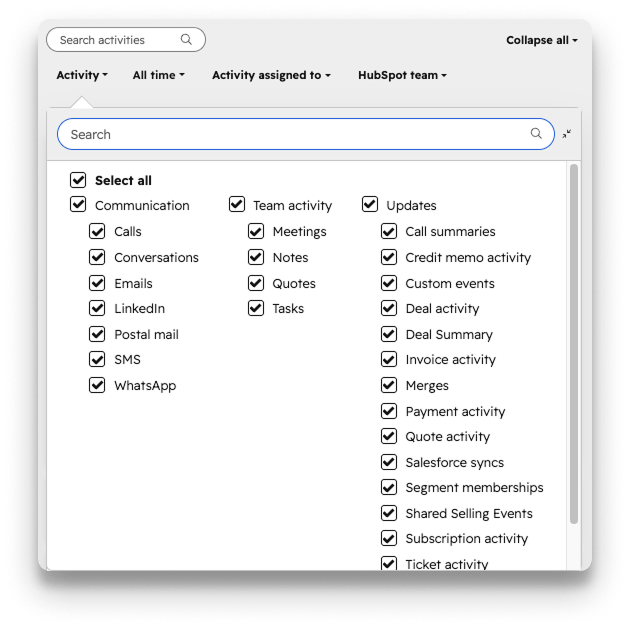
- Ensure that your record view settings in Hubspot are set to view WhatsApps (Activities tab —> Activity drop down —> select WhatsApp).
- You must have your client’s WhatsApp phone number populated in the WhatsApp Phone Number field of your Hubspot Contacts.
- If you want chat transcripts to sync to objects other than Contacts, ensure that the Contact is associated to the Deal / Ticket / Project / Company object in Hubspot. Please provide your Coral rep with your Hubspot deal pipeline names associated to these objects.
- Your Coral WhatsApp chat transcripts will be uploaded to Hubspot daily around midnight, according to the timezone that you choose. To select your timezone, navigate to the Controls tab in your Coral Admin account.
- Coral can configure your setup to accomodate a Contact presence in multiple records of the same object, where the record that the sync attaches the chat transcript to is determined by the Coral user inside the chat. Talk to your Coral rep to learn more.